![3_Transparent_Image_footer.png]](https://novineer.com/hs-fs/hubfs/3_Transparent_Image_footer.png?height=32&name=3_Transparent_Image_footer.png)
Open Plugins > NoviPath > License, paste the key from your email, and click Activate. The computer must reach license.novineer.com during activation; afterwards NoviPath works offline until the license expires. If you have reached your license limit, deactivate on the other machine first.
Your trial key arrives by email. Activation needs internet access to license.novineer.com; after that the plugin works offline until the license expires.
1. Open Plugins > NoviPath > License
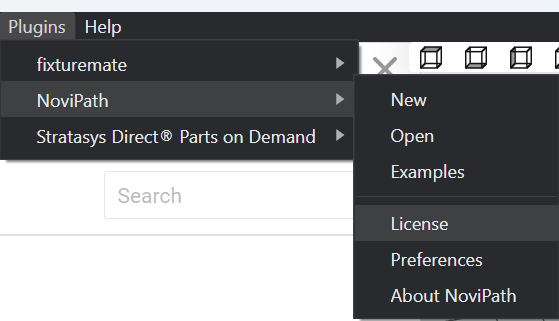
Plugins > NoviPath > License.
2. Paste the key and click Activate
If you have reached your license limit, deactivate on the other machine first. Need a key? Email tech@novineer.com.
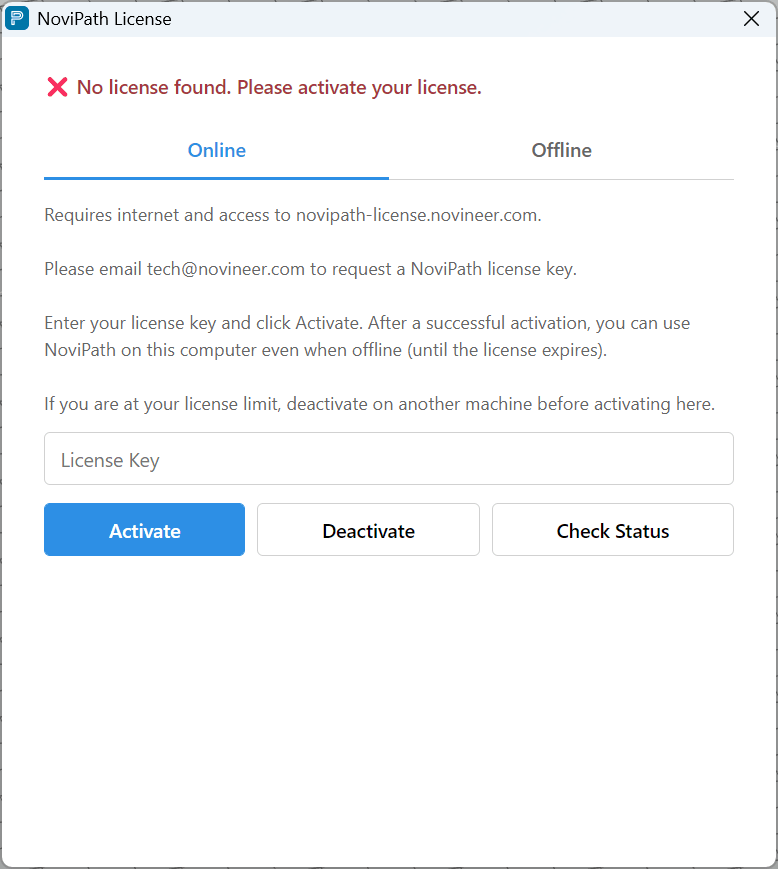
Enter the key, then Activate.
You’re done. NoviPath is installed and licensed. Open the plugin menu to create a new project or explore the bundled examples: see Tutorial: your first simulation and Product tours and example projects.